Notes and writing
Understand how your notes sync
Compare server-based sync, file sync, and direct transfer, with checks for conflicts, offline work, and device changes.
On this page
Sync makes changes available elsewhere. The architecture determines where the authoritative data lives, how conflicts are resolved, and what happens when a device is offline. It does not, by itself, provide a recoverable history.
Identify the source of truth
In a server-based service, devices exchange changes through the service. In a file-based arrangement, another tool may sync the files used by the note app. Direct device-to-device transfer has its own availability and pairing requirements.
The visible result can look similar while the failure modes differ. Read the app's documentation rather than inferring its architecture from the presence of a sync icon.
Try an offline edit
Create a harmless test note, edit it while offline, and reconnect. Check when the other device receives the change. If you use several devices, test what happens when both edit the same note before syncing. Keep the experiment separate from important records.
Check deletion and conflicts
Find out whether deletion propagates, where conflicted copies appear, and whether earlier versions remain accessible. A file-sync tool and a database-based note app are not automatically a safe combination; follow the app's supported storage configuration.
Verify before replacing a device
On the new device, inspect recent notes, attachments, and older records. Confirm that the old device has no unsynced changes and that you retain needed recovery information. Only then proceed with the old device's retirement.
Keep an independent backup for failures that sync cannot resolve, such as account loss. If privacy matters, also check the encryption and key model.
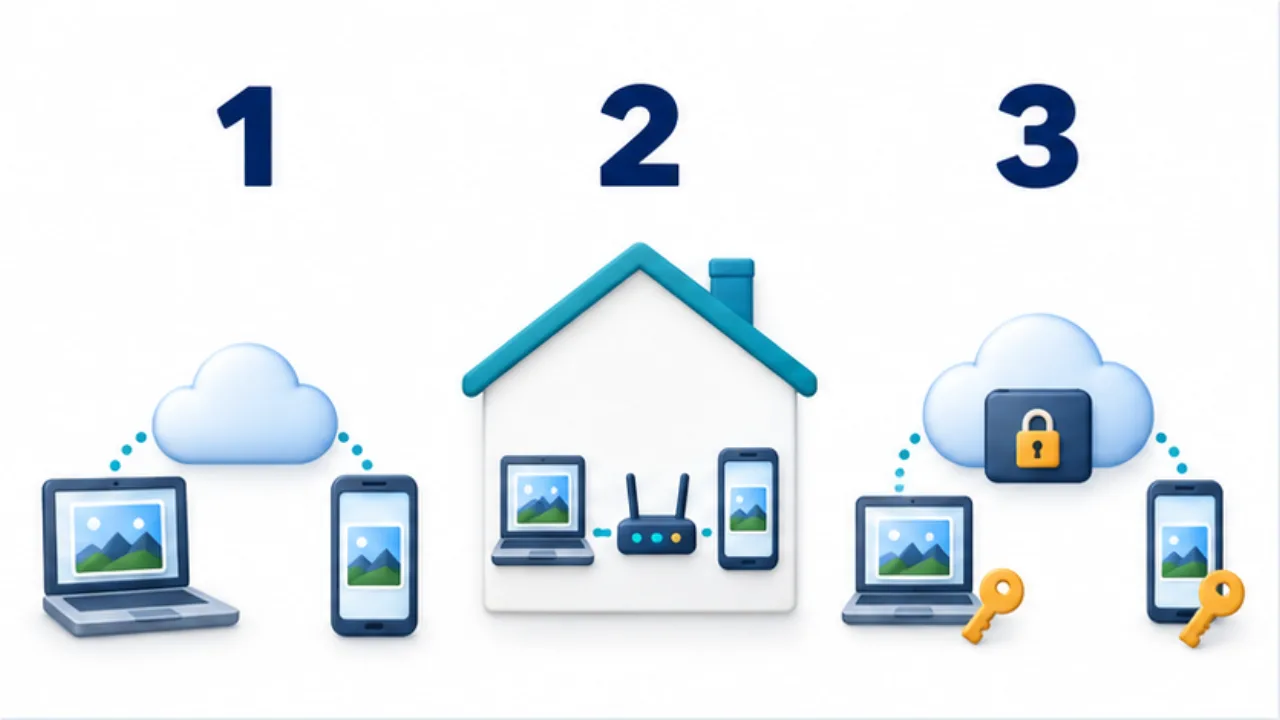
Select the image to enlarge.
- Cloud sync exchanges changes through a server.
- Direct LAN sync connects devices on the local network.
- E2E describes endpoint encryption rather than a separate network route.
Split “it has not arrived” into separate stages
When a phone edit does not appear on a computer, deleting and recreating one side may destroy an unsent change. First distinguish local saving, transfer, and display on the receiving device. A missing item on screen does not tell you which stage failed.
| Stage | What to inspect | Assumption to avoid |
|---|---|---|
| Local saving | Does the text remain after reopening the note? | Typing on screen proves saving finished |
| Transfer | Account, connection, sync status, and errors | Wi-Fi access proves synchronization |
| Receiving and displaying | Correct note, search scope, and attachment download | Missing from a list means deleted |
If the app exposes a status and time, record them. A harmless test note can help distinguish a general communication problem from a problem affecting one record. Preserve readable unsynced content before attempting recovery steps, and follow the application's supported procedure.
Resolve conflicting edits by content, not just time
Imagine editing a quote note separately on a phone and computer. The phone has updated shipping information; the computer has revised payment terms. Selecting the file with the later timestamp may lose one useful change.
Compare the two versions by topic, combine the information that should remain, and label any conditions that are still unresolved. Keep the originals until the merged note can be read on the required devices. If the application has a dedicated conflict-resolution procedure, use it; copying and deleting files may not preserve its history or references.
Also keep the transport route separate from the encryption model. Cloud synchronization may use provider-managed encryption or end-to-end protection. A direct local connection has its own pairing and availability requirements. None of these labels alone tells you which concurrent edit wins.
The practical goal is to understand saving, transfer, and conflict resolution in the combination of devices you actually use. That evidence is more useful than assuming every application with the same architectural label behaves identically.