Notes and writing
Give incoming notes an inbox
Capture new material in a predictable place, then decide what needs action, reference storage, or no further work.
On this page
An inbox separates capturing something from deciding what to do with it. The benefit is a clear landing place for incoming material. It becomes less useful when nothing is ever reviewed, so capture and processing need separate, realistic routines.
Choose a default capture location
Use a note, folder, or app that is easy to reach. Keep necessary work and personal boundaries; a single inbox is not a reason to copy confidential work into a personal account. If several capture channels are unavoidable, list them so none becomes invisible.
Write enough context to understand the item later. “Call Morgan about the September delivery” is more actionable than “call.”
Process the meaning, not just the appearance
When reviewing an item, ask whether it requires action. If it does, identify the next step and put any reminder in the appropriate system. If it is reference material, move or link it to a place where it can be retrieved. Delete material only when you have decided it is no longer needed.
Set a review rhythm that fits the input
The interval depends on how much arrives and how quickly commitments expire. A weekly review may fit ideas but miss a deadline tomorrow. Look at the oldest unprocessed item and the consequences of delay, then adjust the schedule.
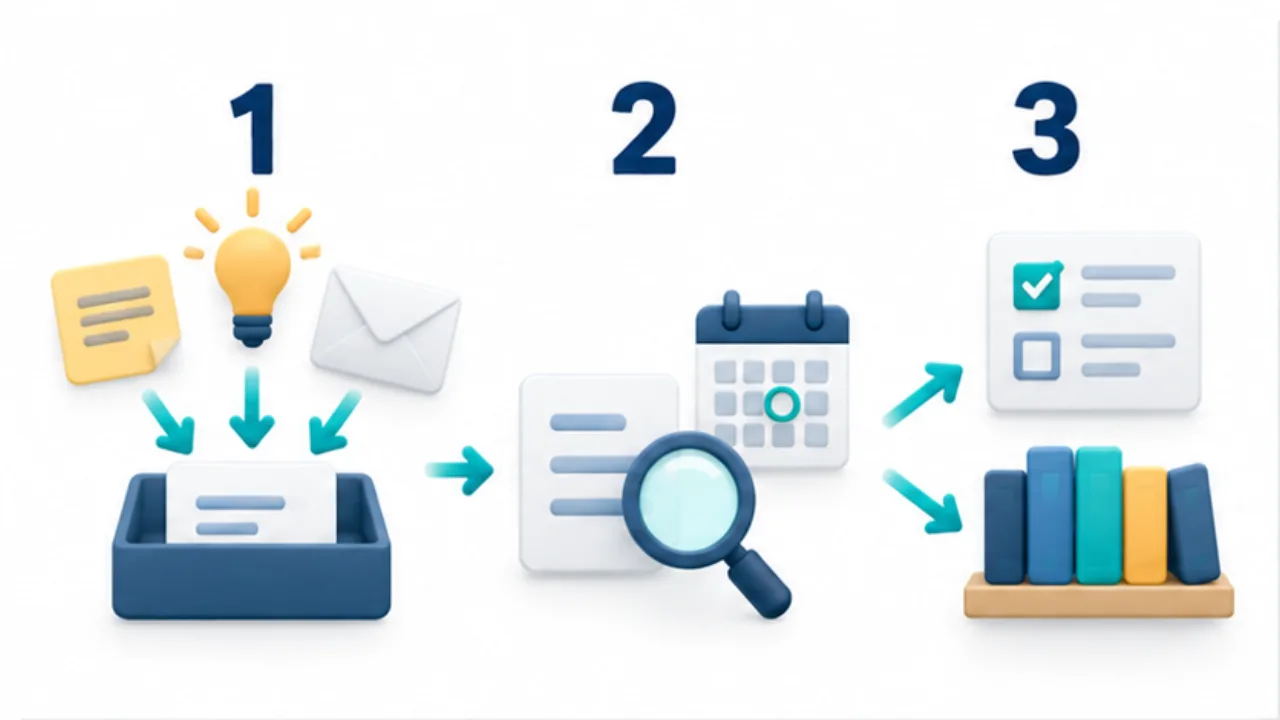
Select the image to enlarge.
- Collect ideas and incoming information in a chosen inbox.
- Review it to clarify what needs to happen.
- Move actionable items and reference information to their useful destinations.
Watch for a hidden archive
An inbox is not necessarily empty every day, but you should be able to tell what remains undecided. Moving everything into a folder named “Later” does not resolve that uncertainty. Keep processing short enough to repeat, and distinguish capturing an idea from committing to complete it.
See tasks and notes for the handoff between a record and an action.
Follow one item through the handoff
Consider a fictional request to check a supplier quote. A paper note saying “quote, conditions” captures a fragment but leaves the action unclear. Rewrite it as “Ask the supplier whether shipping is included; a reply is needed by Thursday.” Register the action and deadline in the system you use for reminders, then mark the inbox entry as transferred and link to that task.
| Material | Inbox status | Where it is managed next |
|---|---|---|
| A reply needed by Thursday | Follow-up task created | Task list with a deadline |
| Background to the quote | Reviewed reference material | Project note |
| A possible future idea | An option, not a commitment | List for later review |
Reviewed does not mean completed. Sending the question still leaves a reply to wait for. Track that waiting state at the destination so an empty inbox does not hide an unfinished commitment.
Avoid copying the entire source into several places unless there is a reason. A link, a short explanation, and the next action may be enough. The useful outcome is that you can identify both the original context and the current owner of the work.
Recover after a missed review
When incoming notes have accumulated, first look for deadlines, requests where someone is waiting, and records that would be costly to lose. This does not make older material unimportant. It gives you an order for dealing with consequences before organizing the rest.
Schedule another pass for the remaining items, and keep a visible distinction between material you have reviewed and material whose meaning is still undecided. Moving an unread pile into an archive does not establish that distinction.
If work and personal information need separate accounts, standardize the review routine without combining their contents. Check work requests in an approved work environment and personal reminders in the personal system. The information boundary follows the rules for that information, not whether the device happens to be privately owned. A reliable inbox routine can include several necessary locations when you know which ones to check.