Keyboards and terminals
How a Japanese input method turns keys into text
Follow preedit text, conversion candidates, and confirmation, and separate input-method behavior from application shortcuts.
On this page
Japanese input often involves an intermediate composition rather than committing each key directly. Understanding that intermediate state helps explain why Enter, Backspace, and cursor keys sometimes behave differently while you are typing.
Follow the composition
The keyboard provides input to an input method. In romaji entry, letter sequences can become kana. The input method keeps a composition, offers conversion candidates, and eventually commits text to the application.
The details depend on the input method and configuration. A kana layout changes how the reading is entered, not the need to choose or confirm the desired written form.
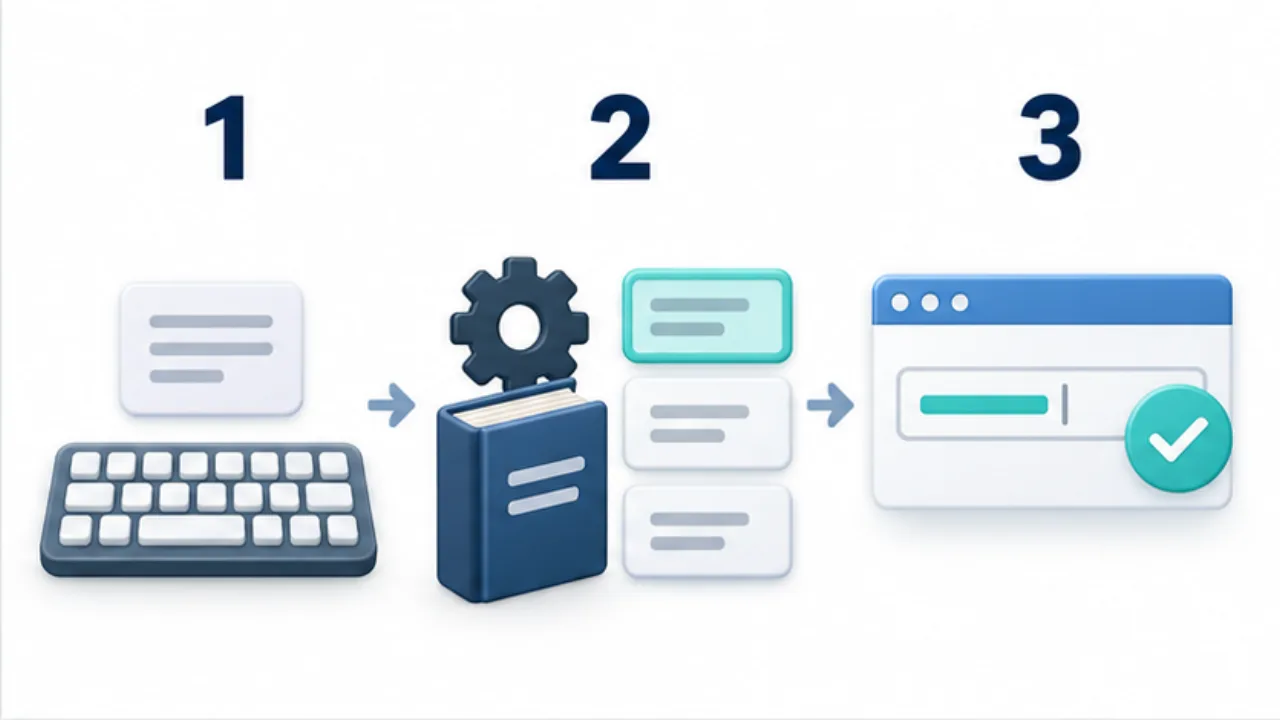
Select the image to enlarge.
- The IME receives input and composes the kana sequence.
- It uses dictionary and context information to produce candidates.
- The selected text is committed into the application.
Distinguish confirmation from submission
While composing, Enter may confirm text instead of submitting a form or running a command. The application and input method need to coordinate that state. If a command runs unexpectedly, inspect whether the text was still being composed and which layer received the key.
Understand dictionaries and learning
Conversion candidates can depend on dictionaries, context, and learning features. Not every confirmed word is necessarily stored; privacy modes and settings can change behavior. A user dictionary is an explicit way to register a recurring name or term when the tool supports it.
Diagnose at the correct layer
Wrong symbols from a physical keyboard suggest a layout issue. An unwanted kanji candidate suggests conversion or dictionary behavior. A shortcut that closes a screen may be handled by Android or the application before the input method sees it.
For the engine used in some Japanese input systems, see what Mozc is.
Observe composition and confirmation in a practice field
Connect the explanation to an action by using a draft or disposable field that will not send anything. Enter a reading, select a candidate, and confirm it slowly. Underlines and candidate displays vary, so identify the indicators used by your own environment.
Then compare correcting text before confirmation with correcting it afterward. Before confirmation, candidates and phrase boundaries may be involved. Afterward, the receiving application's cursor and selection controls also matter. The exercise shows why the same deletion key can have a different effect depending on what is currently being edited.
| State | Where to look | What to establish |
|---|---|---|
| Entering a reading | Text and candidate area | Which range remains unconfirmed |
| Choosing a candidate | Selected phrase | The intended word is selected |
| After confirmation | Application text | The remaining text is correct |
| Before sending or executing | Entire input field | The content is ready for that action |
Use a draft without a real recipient when testing an application with submission controls. Do not discover by accident whether Enter confirms or sends.
Include the transition in an input bug report
The final string may not be enough to reproduce a Japanese-input problem. Selecting a candidate, pasting text, and using a physical keyboard can produce the same visible text through different paths.
Record the input method, reading, selected candidate, key pressed, and resulting display in sequence. “The final character duplicated when I confirmed a selected candidate” identifies a stage to investigate. Include the device, input method, and receiving application as well.
Replace confidential original text with a short fictional sample where possible. If the same problem occurs, the report can focus on relevant actions without exposing the original content. Distinguishing an unwanted candidate ranking from missing or duplicated text also helps identify whether conversion behavior or communication with the receiving app needs attention.