Keyboards and terminals
Choose a terminal workflow for your phone
Decide whether commands should run on a remote computer, in Android, or in a cloud development environment.
On this page
A terminal on a phone can mean several different things. The important first question is where the commands execute. That determines which files, tools, and permissions are involved.
Connect to an existing computer
An SSH client provides a terminal connection to another machine. The remote computer runs the commands and holds the working files. This suits continuing work that is already configured there, provided the machine is awake and reachable.
Use a persistent terminal session such as tmux when you need to reconnect after the phone loses its connection. Persistence does not protect against the remote computer shutting down or the process failing.
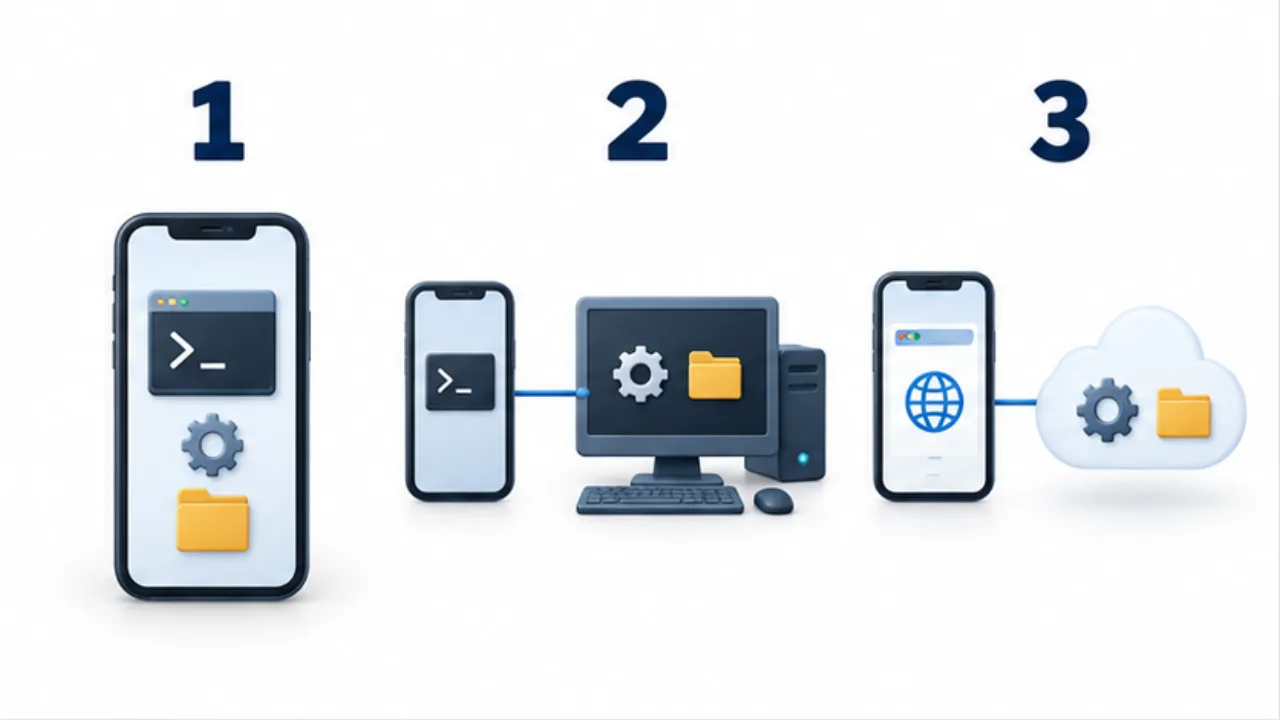
Select the image to enlarge.
- A local environment runs on the phone itself.
- SSH operates an environment on the remote host.
- For a browser environment, check the service’s storage and session conditions.
Run locally on Android
Termux provides a local terminal environment on Android. Its files and processes belong to the phone. It is useful for supported command-line tools, but should not be assumed to reproduce every desktop Linux environment or run indefinitely in the background.
Consider a hosted environment
A cloud development environment moves execution to a hosted machine. Check access, persistence, service limits, and costs before depending on it. It still needs an input method that can send the keys used by your shell and editor.
Test the input path
Before moving real work, try cursor movement, Tab, Escape, Ctrl+C, and paste in a harmless session. Check that the keyboard, terminal client, tmux, and application do not intercept the same shortcut in conflicting ways.
Start with a small task whose output is easy to inspect. See SSH client checks and Termux basics for the two common routes.
Name the environment before you change anything
A terminal window is visible on your phone, but the files it controls may belong to another computer. Keeping those two locations separate makes several common problems easier to understand: a saved file seems to disappear, an edit affects the wrong project, or a website remains unchanged after saving.
Imagine correcting a page stored on a computer at home. Before connecting, you are using the phone's environment. After establishing an SSH session, your commands run in the remote environment. If publishing requires another step, saving the source file does not itself update the public page. Treat connecting, editing, saving, and checking the published result as separate stages.
| Question | Answer to establish |
|---|---|
| Which computer am I controlling? | The phone or the remote host |
| Where am I working? | The intended project and directory |
| Where will the change remain? | The destination computer and file |
| What proves the task worked? | Command output, a generated file, or the live page |
For an initial exercise, inspect a practice file rather than change an important configuration. This checks both whether you can enter text and whether your actions affect the intended environment.
Leave enough context to resume after an interruption
Mobile work can stop without a planned logout. A connection drops, the screen closes, or you need to put the phone away. The last command alone rarely explains what remains to do.
Record the host, working directory, operation started, last confirmed state, and next check. For example: “Conversion started on the remote host; completion not confirmed; inspect the output before continuing.” That note helps prevent starting a second copy of an operation merely because you cannot see its original window.
A retained tmux session is not proof that the operation succeeded. On returning, inspect the existing session and its output before deciding what to run next. Likewise, closing the phone's connection screen is not sufficient evidence that a remote process has stopped. Separate connection state from task state whenever you resume.